Support solutions, FAQ's and other support documents
will appear here when available. All support will be handled in
English only at this time.
Last updated: April 3, 2010.
When will Wine Chronicle be available for the iPhone, iPad, iPod Touch?
We'd love to have Wine Chronicle available for these platforms. There are a few things stopping us from supporting them right now.
- The iPad was just released and it isn't available globally yet - so I haven't been able to purchase one yet.
- The database engine that Wine Chronicle uses, FileMaker Pro, does not yet support the platform. We hope that it will soon.
- Synchronization issues. Currently you have your wine collection stored on your desktop/laptop version of Wine Chronicle. We want to make it as easy as possible to sync the data between a computer and handheld device. I wouldn't want to have to re-enter all of my data, neither will you.
- In order to support the new platforms we need to re-write Wine Chronicle in a newer version of FileMaker Pro. We also don't want to just update the program, we want to make it the best mobile wine database possible.
I'm having trouble importing from the provided Microsoft Excel file.
Make sure you have filled out as many columns as possible. The likely problem is you have not included both a wine and vineyard name. When Wine Chronicle imports the data it has to build links between the different pieces of information. This is why you have to specify the import file several times.
If you do not have both the wine name and vineyard filled out in the spreadsheet, Wine Chronicle has problems linking the data.
Is Wine Chronicle available in other languages?
Not yet. If there is demand for it we will consider developing other
versions. Please let us know which languages you would like to see.
Does Wine Chronicle support Palm OS handhelds or
Pocket PC handhelds?
Not at this time. The Palm OS conduit used by our development platform
only supports limited data transfer. We have looked at creating
an Export feature in Wine Chronicle and then an import feature on
a Palm OS database application. Currently, we feel that the user
experience for this solution would be too cumbersome. As soon as
we can come up with a seamless method of transferring data with
the Palm we will work on it.
Can I import from other programs?
Yes. Wine Chronicle can import from an included MS Excel spreadsheet
template or from a tab-separated text file. It is much easier to
use the Excel template.
I use DragThing on the Macintosh and Wine
Chronicle won't start.
There is a known conflict between DragThing and applications created
in FileMaker Pro. FileMaker Pro applications (such as Wine Chronicle)
are incompatible with DragThing. The application will start, but
no windows will appear. The solution is not to start Wine Chronicle
from a DragThing dock. This happens in both the Mac OS X and Mac
OS 8/9 version of Wine Chronicle. The developer of DragThing knows
about this issue.
My Registration Number won't work.
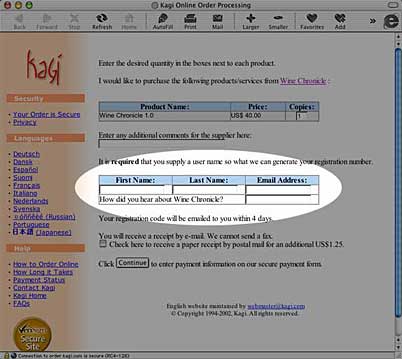
Make sure than you enter your name exactly as filled
out on the Kagi purchase system. The fields that are most important
are the First and Last Name fields (see the image below). This is
what is used to generate your registration number. Any extra spaces,
quotes or other characters can cause this to fail.
If you have questions about Wine Chronicle please
send an email to Support. |